Virgin Media provides a Wi-Fi hub with every broadband plan. The Hub 5 and Hub 5x are its latest models, and both support Wi-Fi 6. The Hub 5 connects to Virgin Media’s cable network. The Hub 5x is the full fibre version and connects to the newer XGS-PON network instead.
You cannot pick one or the other. Virgin Media supplies the hub that matches the connection at your home. As of the end of October 2026, Virgin Media has not announced a Hub 6 or a Wi-Fi 7 hub, so these two remain the newest routers across its broadband plans.
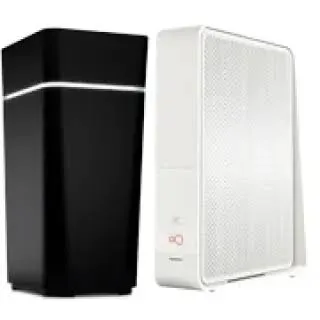
Virgin Media Hub 5 and Hub 5x specifications
| Specification | Hub 5 | Hub 5x |
|---|---|---|
| Wi-Fi standard | Wi-Fi 6 | Wi-Fi 6 |
| Wi-Fi bands | Dual-band, 2.4GHz and 5GHz | Dual-band, 2.4GHz and 5GHz |
| 2.4GHz band | 3×3, 802.11b/g/n/ax | 3×3, 802.11b/g/n/ax |
| 5GHz band | 4×4, 802.11ax | 4×4, 802.11ax |
| Internal antennas | 7 | 7 |
| Network connection | DOCSIS 3.1 cable | XGS-PON full fibre |
| Fastest Ethernet port | 1 x 2.5Gbps | 1 x 10Gbps |
| Other Ethernet ports | 3 x 1Gbps | 3 x 1Gbps |
| Modem mode | Yes | Not currently available |
| Guest network | Yes | Yes |
| Intelligent WiFi | Yes | Yes |
| WPS button | Yes | Yes |
| Phone line | Yes | Yes |
| WiFi Pod support | Yes | Yes |
| Removable password card | Yes | Yes |
Hub 5 vs Hub 5x
Over Wi-Fi, there is not much between them. Both use the same Wi-Fi 6 radios, the same seven antennas and the same dual-band setup. A phone or laptop in the next room will typically see similar speeds from either hub.
The differences are in the connection and the wired ports. The Hub 5 takes the coaxial cable that Virgin Media has used for years. The Hub 5x connects to the full fibre network that Virgin Media and nexfibre are rolling out, which is needed for Gig2 and symmetrical speeds.
On wired speed, the Hub 5x has the edge. Its 10Gbps port leaves a clear gap over the 2.5Gbps port on the Hub 5. In practice, the 2.5Gbps port is already enough to get full Gig1 speed to one computer. The 10Gbps port matters on Gig2, where a single wired device can use more than 2Gbps.
Modem mode is the other big difference. The Hub 5 has it, and the Hub 5x currently does not.
Plans that come with the Hub 5 or Hub 5x
The Hub 5 comes with cable plans from M125 up to Gig1, and with every new TV bundle except Flex. The Hub 5x comes with plans on the full fibre network, including Gig2. A postcode check shows which network reaches a home, and that decides the hub.
Hub 5 modem mode
Modem mode turns off the Hub 5’s Wi-Fi and routing, so your own router or mesh system can take over. It is particularly useful for gamers and anyone who wants more control over their home network.
- Connect to the Hub 5 and go to 192.168.0.1 in a web browser.
- Select Next and enter the Hub settings password from the base of the hub. This is not the Wi-Fi password.
- Select Super Hub, then Modem Mode.
- Select Enable Modem Mode, then Apply Changes. The hub restarts.
- Connect your router’s WAN port to the hub with an Ethernet cable.
Virgin Media’s help pages do not say which port to use. A Virgin Media forum moderator once said only port 1 works in modem mode, but users report that the 2.5Gbps port works as well. If your router has a 2.5Gbps WAN port, try the 2.5Gbps port on the Hub 5 first. Move to port 1 if the connection does not come up.
In modem mode, the hub’s settings page moves to 192.168.100.1. WiFi Pods stop working, because the hub’s Wi-Fi is off. To switch back, go to 192.168.100.1, enter the Hub settings password, select Hub Settings, then Modem Mode, and choose Enable Router Mode. A factory reset also returns the hub to router mode.
Hub 5x modem mode
Virgin Media’s help page still says modem mode is not currently available on the Hub 5x. The hub launched with the 2Gbps service in early 2024, and the option has not appeared since. Virgin Media has not given a date.
Hub 5x users who want their own equipment generally connect a mesh system or router in access point mode and switch off the hub’s Wi-Fi. This works for most homes, but the Hub 5x still handles the routing, so it is not a full replacement for modem mode.
Setting up the Hub 5
- Switch off and unplug the old hub, and disconnect all its cables. Keep the spanner for the wall socket.
- Push the red-banded end of the isolator cable firmly into the Virgin Media socket on the wall.
- Connect the blue or black-banded end to the socket on the back of the Hub 5.
- Plug in the power cable and switch on at the wall and on the hub.
- Wait for the light on the front to turn solid white. It can take up to 30 minutes before the connection settles.
- Join the Wi-Fi network. The name looks like VM1234567, and the name and password are on the base of the hub and on the removable card.
The Hub 5x connects to Virgin Media’s full fibre line rather than the coaxial wall socket, so it follows the setup instructions sent for full fibre homes.
Hub 5 settings, lights and reset
The settings page is at 192.168.0.1. Sign in with the Hub settings password printed on the base of the hub. From there you can change the Wi-Fi name and password, turn on the guest network and set up port forwarding. The Virgin Media Connect app also lets you manage the Hub 5, check Wi-Fi strength in each room and position WiFi Pods.
The Hub 5 has a single light on the front, at the bottom right. Solid white means the hub is ready. The light flashes other colours to show its status or a connection problem. If the light is not solid white and the Wi-Fi is not working, run a broadband test from the Virgin Media help pages or the app.
To restart the hub, switch it off at the wall, wait 10 seconds and switch it back on. Allow 5 to 10 minutes. For a factory reset, hold the reset button on the back or base for 10 seconds with a pen. A reset restores the original Wi-Fi name and password, so any changes have to be made again.
Wi-Fi performance and WiFi Max
Wi-Fi 6 lets the Hub 5 and Hub 5x handle many devices streaming and downloading at once with less congestion than older hubs. Intelligent WiFi automatically picks the least busy connection to cut interference from neighbouring networks. Older Wi-Fi 5 devices still connect, but they miss out on some of the gains.
Range is where a single hub can struggle. Thick internal walls, a long home or a loft office can all leave weak spots. Virgin Media’s answer is WiFi Pods, and up to three can work with either hub. WiFi Max adds a guarantee of at least 30Mbps in every room of the main home, subject to Virgin Media’s conditions. It comes with Gig1 and selected Volt plans, and other plans can add it for a monthly fee.
For gaming or working from home, a wired connection is still the best choice. Use the 2.5Gbps or 10Gbps port for the device that needs the most speed. If Pods are not enough, mesh Wi-Fi or a booster from another brand can fill the gaps.
Free Hub 5 upgrade for existing customers
Virgin Media started upgrading selected Hub 3 and Hub 4 customers to the Hub 5 in October 2025, at no extra cost. It says thousands more customers will be upgraded through 2026. Others may be offered a Hub 5 after a broadband check, or when an older hub needs replacing because of a fault.
You do not need to do anything until Virgin Media gets in touch. It contacts eligible customers by email, text or through their online account, and you can check your status in My Virgin Media. The Hub 5 usually arrives by post for self-installation. Return the old hub in the packaging provided if Virgin Media asks for it. If it does not, recycle it.
Upgrading to Gig1 is the other route. Customers with a Hub 3 or older can get a newer hub by moving to Gig1, where it is available. The Hub 5 carries the model number F3896LG-VMB on the label underneath, which makes it easy to tell apart from the older Virgin Media hubs.
Virgin Media Hub 5 verdict
The Hub 5 does the job well. Wi-Fi 6, seven antennas and a 2.5Gbps port mean it can comfortably support a busy household on any cable plan, including Gig1. It is a clear step up from the Hub 4, and many existing customers are now being offered one free.
It is starting to lag behind some rivals, though. Virgin Media stopped short of using the newer Wi-Fi 7 standard, while Vodafone now offers the Wi-Fi 7 Ultra Hub 7 and Community Fibre supplies Wi-Fi 7 mesh routers on its faster plans. The Hub 5x adds a faster wired port but no extra Wi-Fi speed, and the missing modem mode remains its main weakness.
Pros and cons
Pros
- Wi-Fi 6 on both hubs
- 2.5Gbps Ethernet port on the Hub 5 and 10Gbps on the Hub 5x
- Modem mode on the Hub 5
- Works with WiFi Pods and WiFi Max
- Included with the plan at no extra cost
- Free upgrades for selected Hub 3 and Hub 4 customers
Cons
- No Wi-Fi 6E or Wi-Fi 7, and no 6GHz band
- No modem mode on the Hub 5x
- You cannot choose between the Hub 5 and Hub 5x
- Large homes usually need Pods for full coverage
Virgin Media Hub 5 FAQs
Is there a Virgin Media Hub 6?
Not yet. Virgin Media has not announced a Hub 6 or a Wi-Fi 7 router. The Hub 5 and Hub 5x are still its latest hubs.
How long does a new Hub 5 take to connect?
Usually a few minutes, but Virgin Media says it can take up to 30 minutes before the connection settles.
Can I use the Hub 5 for a home phone?
Yes. The Hub 5 and Hub 5x have a phone socket, so a compatible handset plugs straight into the hub for Virgin Media home phone calls.
Do I have to return my old hub?
Only if Virgin Media asks for it. A return guide comes in the box with the new hub, and you may be charged if you do not send back kit Virgin Media has requested.